



- TL;DR: In this article, we take a closer look at software audits and how they help you find hidden problems before they become expensive disasters.
- Software audit is a systematic examination of your systems to find security vulnerabilities, license violations, technical debt, and performance issues that cost you money.
- In our article, we explain the main benefits of regular software audits.
- We name the most common tools to conduct software audits on your own.
- Also, we built a 6-step algorithm on the internal auditing process.
- Additionally, we look at 2 real-world scenarios, why software audits are important, and how ignoring them may cost your company MILLIONS of dollars.
Your software keeps your business running, but if you are here, you probably want to know what’s actually happening under the hood. Maybe you’re paying for licenses you don’t use, or code can break at the worst possible moment, who knows? A software audit reveals these hidden problems while your system still work. We’ve been providing software audit services for over a decade at ELITEX, so we know what typically goes wrong and how to spot it early. And today, we’ll share a decade of our experience in one detailed guide.
What is a software audit?
A software audit is a systematic review of your software in order to find what’s broken or risky. Software audit can help you find and address security risks, technical problems, and operational inefficiencies. During the software audit process, you examine code quality, check license compliance, review architecture, assess whether your current setup can handle future growth, and spot other issues that prevent your software from running at peak efficiency.
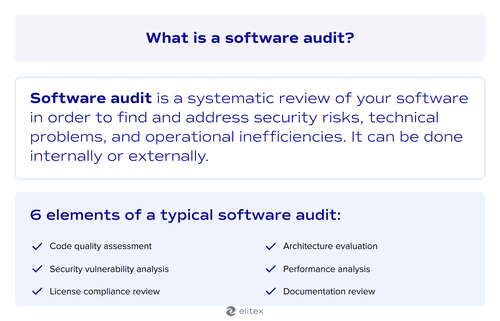

Here’s what a typical software audit covers:
- Code quality assessment: Here, auditors look at how the code is written and organized. Poor code structure means bugs hide easily and new features take forever to build.
- Security vulnerability analysis: This reveals weak points where attackers could get in. For this part, auditors typically check for outdated dependencies, exposed credentials, missing security patches, unencrypted data transfers, and weak authentication protocols that create real risks.
- Software license compliance review: Many companies use software without proper licenses or pay for tools nobody uses anymore. This part of the software audit prevents legal issues and cuts unnecessary costs.
- Architecture evaluation: At this part, we, at ELITEX, typically map how different parts of your software ecosystem connect and communicate. Sometimes, the architecture made sense 5 years ago, but now it only creates bottlenecks.
- Performance analysis: This part measures how fast your software runs and where it slows down.
- Documentation review: Here, we typically check if your team actually documented what they built and how it works. Missing documentation means only one person knows how to fix critical systems, which becomes a problem when they leave.
Note: We’ll talk about types of software audit in more detail in the following sections.
Internal vs. external audit software
Basically, when it comes to auditing software, you have 2 options. You can run it with your in-house team or hire outside audit experts. Both approaches have different strengths depending on what you need to find.
| Aspect | Internal audit | External audit |
| Cost | Lower direct costs since you use existing staff | Higher upfront investment, but includes specialized expertise |
| Objectivity | The team might overlook familiar problems or avoid criticism. Bias is quite a typical problem here | Fresh perspective spots issues your team got used to. Unbiased approach |
| Technical knowledge | Deep understanding of your specific systems, history, and why something is in place | Broader experience across different industries and tech stacks |
| Timeline | Faster access to code and documentation | Needs time for onboarding and system familiarization |
| Availability | Competes with regular development work | Dedicated focus without daily operational distractions |
| Trust | Easier communication with existing relationships | Requires building rapport but brings independent validation |
| Depth of analysis | Limited by daily responsibilities and deadlines | Goes deeper into root causes because external auditors have dedicated time and no pressure to sugarcoat findings for internal stakeholders |
| Industry benchmarking | Limited perspective based on your company’s experience | Compares your software against industry standards from working with dozens of similar projects across different companies |
| Compliance expertise | General knowledge of regulations | Specialized understanding of legal requirements and documentation that satisfies regulators and investors |
Summary: A software audit is a systematic review of the software systems to help you find and address vulnerabilities and operational inefficiencies. It can be made internally and externally and typically covers all aspects of the software.
Why conduct a software audit?
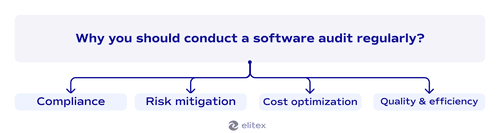
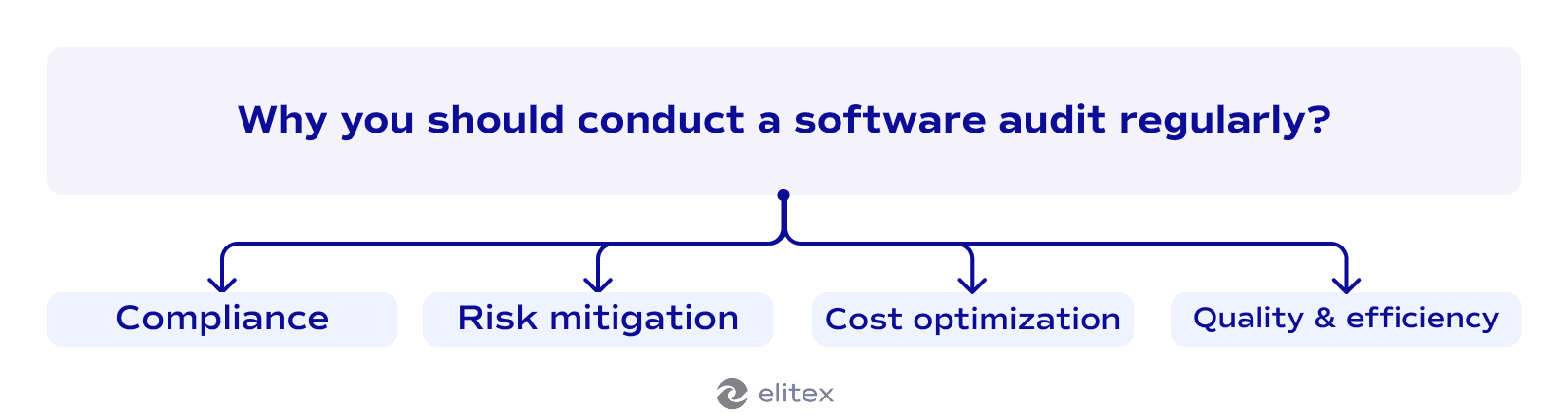
Compliance
There are a lot of regulations in 2026. For instance, GDPR requires you to track what software you use and how you process personal data. HIPAA mandates specific security controls for healthcare software. Financial services need SOC 2 certification to prove they protect customer information properly. A software audit creates the documentation you need for these compliance requirements. Violations bring fines that start at thousands and go into millions, depending on the regulation. Software audits help you deal with compliance.
Risk mitigation
Your software may contain vulnerabilities you don’t know about yet. Outdated libraries create security holes. Legacy code breaks under new conditions. A software audit finds these risks while they’re still manageable instead of waiting for a breach or system failure that costs you customers.
Cost optimization
From our practice, a lot of businesses waste money on unused licenses or inefficient infrastructure. Software audits reveal where you pay for tools nobody uses anymore. Also, with our DevOps infrastructure automation services specialization, we at ELITEX have a trained eye on performance issues that force you to overspend on infrastructure when simple code fixes would solve the problem.
Quality and efficiency
Poor code slows down your development team because they spend time fighting technical debt instead of building features. Software quality audit identifies what needs refactoring so your developers can work faster. Another aspect, better documentation, means new team members become productive in weeks instead of months.
Summary: Regular software audits help you keep your software compliant and cost-efficient, as well as optimize costs and enhance efficiency.
Types of software audits
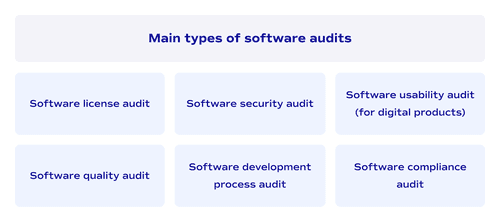
Software license audit
We already covered license compliance briefly in the audit components above, and there is not so much to add. This type of audit checks whether you’re using software according to your license agreements. Companies often install tools across more machines than their licenses allow. A software license audit prevents legal problems before vendors come knocking with compliance demands.
Software quality audit
We also covered the code quality assessment, but the software quality audit takes that deeper. With it, your audit team examines the source code to find bugs, technical debt, and poor coding practices that slow down development. This reveals why your developers take weeks to add simple features instead of days. Clean code means faster releases, and quality audits show you exactly where the problems hide.
Software security audit
A software security audit examines your system's defenses against real attack scenarios. Hackers don't politely knock on the front door. They probe every entry point until something breaks. So when we’re doing software audits at ELITEX, we run penetration tests that simulate actual attacks on your infrastructure. Your login system might look secure until someone tries credential stuffing with leaked password databases. Encryption protects data in theory, but misconfigured SSL certificates expose everything in transit. We dig into your source code because developers often hardcode API keys or leave debug endpoints active in production.
Reputational damage from a data breach destroys customer trust faster than any technical fix can rebuild it. Your business survives downtime, but customers who see their personal information leaked to the dark web don't come back. Risk assessment during the audit prioritizes threats based on actual impact. Some vulnerabilities need patching today because attackers already exploit them in the wild. Others can wait until your next release cycle. This connects directly to the risk mitigation we talked about in the previous section.
Software development audit
Software development audit reviews your entire development process from planning to deployment. At this stage, auditors typically look at how code moves from a developer’s laptop into production. Your team might commit changes without proper review, or maybe your testing catches bugs ut deployment still breaks things. As an experienced DevOps automation services and solutions provider, we at ELITEX also typically trace the path a feature takes through your workflow to find where bottlenecks form (a very typical thing to fix your CI/CD pipeline). Often, such a check reveals that features get stuck for weeks because nobody defined clear approval processes or automated the tedious part. Development process audit helps you to fix all of these issues.
Software usability audit
This is an option for software product companies. Usability audits examine whether people can actually use your software product without getting frustrated. Confusing interfaces mean customers abandon your product halfway through tasks. At this type of audit, we test real user flows to find where people get stuck or give up entirely.
Compliance audit
We already discussed compliance requirements like GDPR and HIPAA earlier. Compliance audits verify your software meets these legal requirements before regulators start asking questions.
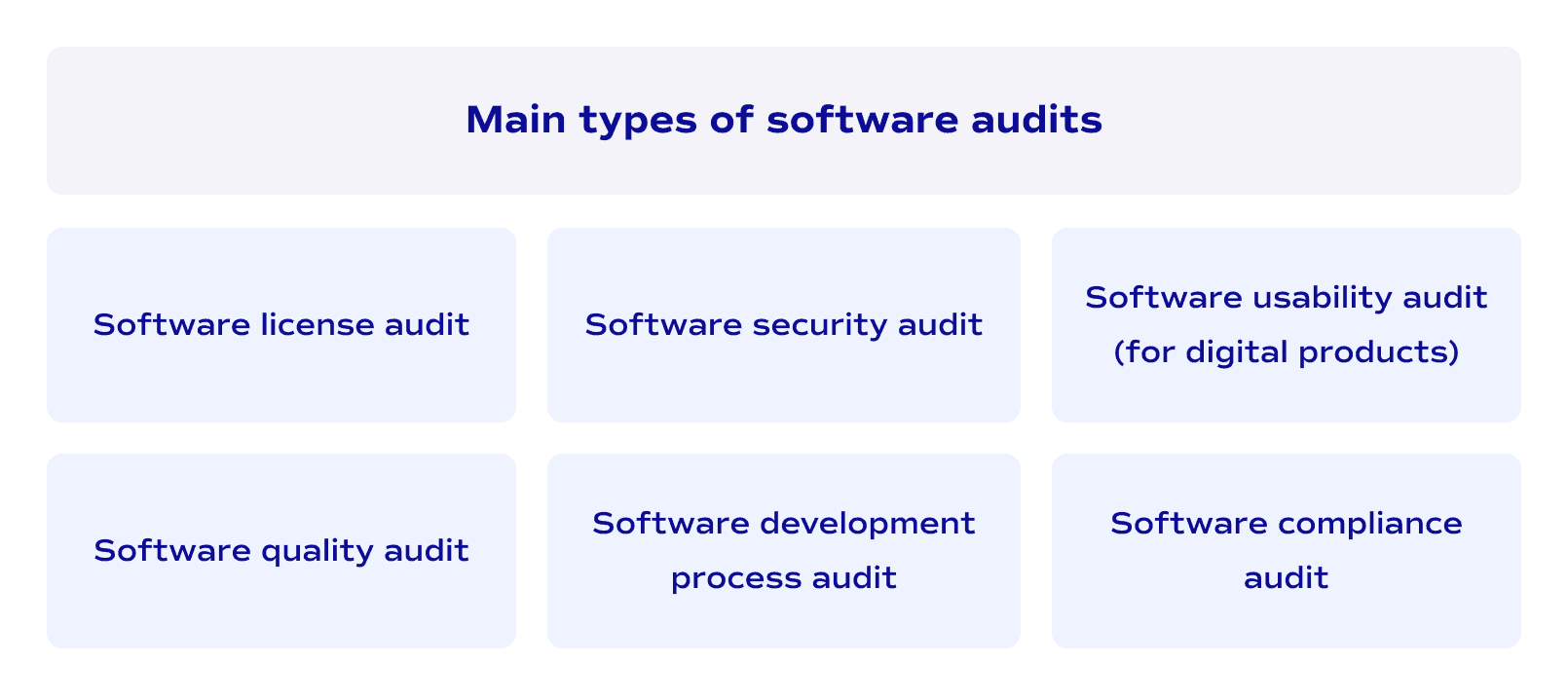
Conclusion: The main types of software audits include: license audits, quality audits, security audits, development process audits, usability audits, and compliance audits.
Note: These six types cover the most common audit needs, but specialized audits exist for specific industries or technical requirements. Your situation might need a different focus depending on your software’s purpose.
Software audit process: step-by-step
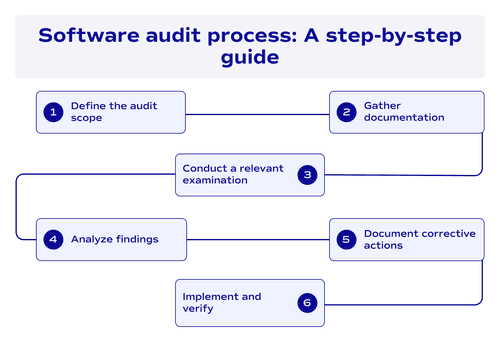

Here’s a short 6-step plan for an internal software audit that you can apply to your product:
- Step 1: Define the audit scope. First, you need to create an audit plan that defines what you’ll examine and why. Here, first of all, define the audit types (we discussed them earlier). It’s important, since security audits require different preparation than compliance audits. Your audit plan sets boundaries so you don’t waste time checking irrelevant metrics and nuances.
- Step 2: Gather documentation. Second, your team should gather audit documentation about your current software. Architecture diagrams, license agreements, deployment logs, and anything else that shows how your software actually works. This step is both preparation to audit and the documentation audit itself, as at this very stage, you already understand whether your documentation matches reality or if nobody updated it since 2019.
- Step 3: Conduct a relevant examination. Then comes the actual examination phase, where code review, risk assessment, and other measurements happen. At this stage, your auditors should test whatever matters to you: authentication systems for security audits, license usage for compliance checks, or user workflows for usability problems. The most important thing here is to pre-pick relevant metrics based on your audit goals. Each audit type follows audit standards specific to what you’re examining, so take them into account.
- Step 4: Analyze findings. Next, auditors usually analyze what they found and compare it against industry benchmarks. Performance issues get measured against similar systems in your industry. Security gaps get rated by severity based on exploitation probability. This analysis separates urgent problems from things you can fix later.
- Step 5: Document corrective actions. Eventually, you receive findings with specific corrective actions for each problem. The report doesn’t just say “your security is weak” but explains exactly which API endpoint lacks authentication or which database query slows everything down. Clear corrective actions mean your developers know what to fix first.
- Step 6: Implement and verify. Finally, you implement fixes and verify they actually work. Some teams run a follow-up audit to confirm that the corrective actions solved the problems without creating new ones. This closes the loop on the entire audit process.
Conclusion: This 6-step process works for internal audits, but most companies find they need external expertise for at least some audit types. Software audits aren’t one-time events but ongoing practices that catch problems before they become expensive disasters.
Software audit checklist for 2026
Now, when we’ve covered audit types and processes, let’s move to the practical software audit checklists you can use when examining your systems. Pick what matters to your situation and ignore the rest.
For general audits, start with the basics:
□ List all commercial software currently installed (you’re probably paying for things nobody remembers);
□ Compare installation counts against your software licenses to catch accidental violations;
□ Identify subscriptions where the last login was six months ago;
□ Check whether contractor access ended when their contracts did (spoiler: it probably didn’t);
□ Verify your backup systems actually work by trying to restore something;
□ Review software vendors’ terms to see what happens if they go bankrupt.
For security audits, things get more interesting:
□ Scan dependencies for known vulnerabilities;
□ Search source code for hardcoded credentials that developers added “just temporarily”;
□ Test authentication against credential stuffing attacks;
□ Verify access controls follow least privilege instead of giving everyone admin rights;
□ Check whether debug endpoints are disabled in production (leaving them active is a “hack me” sign);
□ Review logs for suspicious patterns like login attempts at 3 AM;
□ Audit software vendors’ security practices since their holes become your holes.
For development process audits:
□ Verify code changes require review before merging to production;
□ Check whether automated DevOps pipelines actually run tests or just pretend to;
□ Measure how long features sit in approval limbo;
□ Confirm deployments have rollback capabilities for when things explode;
□ Check if anyone documented the deployment process or if it lives in one person’s head.
For usability audits:
□ Test critical user workflows from start to finish;
□ Find UI elements where users click the wrong button repeatedly;
□ Verify error messages help users instead of just saying “Error 500”;
□ Check mobile interfaces on actual phones, not just browser simulators.
For compliance audits:
□ Document data collection practices;
□ Verify encryption meet required standards for your industry;
□ Confirm audit logging captures everything regulators demand;
□ Review data retention policies.
Conclusion: These checklists cover the most common audit scenarios, but your software might have unique issues that don’t appear on any standard list, so adjust based on what you’re actually looking for.
Software audit examples & use cases
Here are two examples of software system audits in Fortune 500 organizations.
Capital One: The OCC cloud security audit revealed internal audit failures.
In August 2020, the Office of the Comptroller of the Currency (OCC) assessed an $80 million civil monetary penalty against Capital One following a comprehensive security audit investigation. It was the largest penalty ever issued by the OCC for a data breach at that time.
The regulatory audit found that Capital One failed to establish effective risk assessment processes before migrating significant IT operations to AWS cloud infrastructure in 2015. And, critically, the bank’s internal audit function failed to identify numerous control weaknesses and gaps in the cloud environment. The OCC specifically cited that for certain concerns the internal audit did raise, the Board failed to take effective action to hold management accountable, constituting “unsafe or unsound practices that were part of a pattern of misconduct.” The audit was triggered after a 2019 breach exposed data for 106 million customers, including approximately 140,000 Social Security numbers and 80,000 bank account numbers. Beyond the $80 million penalty, the Federal Reserve issued a concurrent cease-and-desist order, and Capital One paid $190 million to settle the resulting class-action lawsuit.
SAP vs. Anheuser-Busch InBev: The largest documented software license audit dispute
In February 2017, SAP America Inc. commenced arbitration against Anheuser-Busch InBev (the world’s largest brewing company, with brands including Budweiser and Corona), seeking damages potentially in excess of $600 million (the largest publicly disclosed software licensing dispute on record).
The claim, revealed in AB InBev’s SEC 20-F filing on page 154 of a 544-page document, alleged that company employees accessed SAP systems and data “directly and indirectly” without appropriate licenses under a September 2010 software license agreement, specifically related to Salesforce.com integration with SAP’s ERP backend systems. AB InBev initially stated it would “defend against SAP’s asserted claims vigorously,” but the company’s 2017 Annual Report disclosed: “The Parties settled the dispute and the matter is now closed.”
While settlement terms remained confidential, licensing specialist Cerno Professional Services noted that AB InBev's IT spending for "improving administrative capabilities and purchase of hardware and software" increased by approximately $270 million in 2017 compared to the previous year, suggesting a substantial (though far less than $600 million) payment to resolve the dispute.
Tools used for software auditing
| Tool | Audit type | What it does |
| SonarQube | Code quality | Scans code for bugs, code smells, and technical debt across multiple languages. Measures test coverage and tracks quality metrics over time. |
| Snyk | Security | Finds vulnerabilities in dependencies and containers. Integrates with your CI/CD pipeline to catch issues before deployment. |
| Black Duck | License compliance | Tracks open-source components and identifies license conflicts that could create legal problems. |
| OWASP Dependency-Check | Security | Scans project dependencies against the National Vulnerability Database to find known security issues in libraries you’re using. |
| New Relic | Performance | Monitors application performance in production. Shows where bottlenecks occur and how many resources different operations consume. |
| WhiteSource | License & security | Combines license compliance tracking with security vulnerability detection for open-source dependencies. |
| Checkmarx | Security | Performs static application security testing (SAST) to find vulnerabilities in your source code before it runs. |
| Datadog | Performance & infrastructure | Tracks infrastructure metrics, application performance, and logs across your entire stack. Useful for finding resource waste. We have covered this tool in detail in our DevOps automation tools guide. |
| GitGuardian | Security | Scans repositories for exposed secrets like API keys, passwords, and credentials that developers accidentally committed. |
| Veracode | Security | Performs both static and dynamic security testing to find vulnerabilities in code and running applications. |
| FlexNet Manager | License compliance | Enterprise license management that tracks software installations and usage across your entire organization. |
How ELITEX conduct software audits
At ELITEX, we don’t use generic software audit checklists and templates because your software problems aren’t generic. Our process starts with a deep understanding of what actually worries you about your system, not what some checklists say we should examine. Maybe you suspect your cloud costs are ridiculous, but don’t know why. Perhaps your deployment takes three days when competitors ship updates daily. We always build the audit scope around your specific concerns and then dig into whatever matters most. This bespoke approach means you get answers to your actual questions instead of a 200-page report about things you already know.
ELITEX brings over a decade of experience as a software audit company specializing in the messy reality of existing systems. We’ve spent years providing legacy software modernization services for companies stuck with code from 2006 that nobody wants to touch. Our strong DevOps background means we spot infrastructure waste that other auditors miss because they don’t understand cloud architecture or CI/CD pipelines. When we audit your software, we look at everything from backend performance to whether your UI makes users want to throw their computers out the window. We’ve done this across healthcare, fintech, e-commerce, hospitality, real estate, publishing, printing, packaging, media, entertainment, science, and a bunch of other domains, so we know what normal looks like in your industry.
Software audit FAQs
What is a software audit?
A software audit is a systematic examination of your software systems to find security vulnerabilities, license compliance issues, technical debt, and performance problems. Auditing software shows you what’s actually broken or risky in your code before those problems cost you money or customers.
What are software audit best practices?
When learning how to audit software, start by defining a clear scope so you don't waste time checking irrelevant systems. Use automated tools first to catch obvious vulnerabilities and compliance issues quickly, then follow up with manual review for context that tools miss. Document findings as you discover them instead of relying on memory later. Prioritize problems by actual business impact rather than theoretical severity, because a critical vulnerability in unused code matters less than a moderate issue in your authentication system. Most importantly, create specific corrective actions with clear owners and deadlines instead of vague recommendations, then follow up to verify fixes actually worked.
What are common software audit risks and red flags?
- Outdated dependencies are the biggest red flag because they contain known vulnerabilities that hackers already know how to exploit.
- If your software uses libraries that haven't been updated in years, you're sitting on a security time bomb.
- Another major risk is missing or outdated documentation, which means only one person knows how critical systems work. When that person leaves, you're stuck reverse-engineering your own software.
- Watch for hardcoded credentials in source code because developers often add API keys "temporarily" and forget to remove them.
- License compliance issues appear when you're using commercial software on more machines than your agreements allow, or running open-source code with restrictive licenses in commercial products.
- Performance bottlenecks that force you to overspend on infrastructure when simple code fixes would solve the problem drain budgets silently.
- Finally, a lack of proper access controls where everyone has admin rights creates unnecessary risk, because one compromised account gives attackers everything they need.
What are audit software tools, and do I actually need them?
Audit software tools are automated programs that scan your systems for problems instead of checking everything manually. Dependency scanners find outdated libraries. Static analysis tools catch code quality issues. License management platforms track what you're using versus what you're paying for. You need these tools because manually reviewing thousands of files takes forever and misses obvious vulnerabilities. However, automated tools only catch predictable problems and can't evaluate business context or architectural decisions. That's why effective audits combine audit software tools with human expertise.
POSTED IN: